The customer portal
Your brand. On your customers' phones.
A portal in your brand — customers see when the Helfer arrives, how much of the Entlastungsbudget is left, and can request reschedules themselves. Every request lands with you; nothing goes out before you approve.
Familie Müller
Sonnenschein Alltagshilfe
Karin is 12 min away
Sonnenschein Alltagshilfe · accompaniment
Relief budget · April
43 € / 125 €
€82 remaining
Recent and upcoming visits
-
Mo · 14:00 · 1,5 Std
Hauswirtschaft
-
Fr · 10:00 · 2 Std
Begleitung · Einkauf
-
Mi · 14:00 · 1 Std
Spaziergang
What families see on their phones
This is how your customers benefit from you using Aldor.
Six functions that replace a call to you on a normal day — from the arrival time to last Thursday's signed Leistungsnachweis.
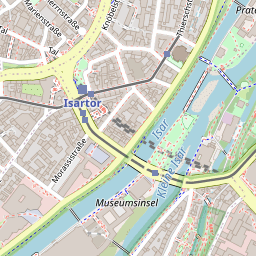
01 · Live arrival
Karin is almost there.
 © OpenStreetMap
Families see the arrival time, not the movement. Helfer see addresses, not surveilled breaks.
02 · § 45b in real time
€184 left in April.
Remaining relief budget in real time — no "we didn't know" surprises at the end of the month.
03 · Message, not phone
A question? Just write.
No more phone tag — families write from the portal, you reply when it suits.
04 · Self-reschedule
Reschedule and cancel.
Families file requests instead of calling. You approve with a click — a request becomes a visit only when you say yes.
05 · Signed visits
What happened — on the record.
- 17 April · 14:00 Karin · accompaniment walk signed
- 15 April · 09:30 Anna · household signed
- 12 April · 14:00 Karin · accompaniment doctor signed
Every visit in the history, with date and helper. Families see what happened — and can look it up later.
06 · Multiple logins per client
The whole family has access.
- Daughter Sabine — full access
- Son Markus — visits and budget
- Mother Müller — own calendar
Daughter in Hamburg, son in Munich, mother at home — same view, same data.
How it works
From client to login in 30 seconds.
As soon as you create the customer with their contact details in Aldor, they receive an email inviting them to the customer portal.
-
01 You add the client.
Name, email or mobile number — same as today. Aldor sends the invitation automatically.
~20 seconds -
02 Your customer receives an invitation.
From your domain (kunden.your-brand.de), in your brand. Email or SMS.
SMS on request -
03 One click — the portal opens.
Works smoothly in the browser, no app.
Device-bound -
04 Family invites others themselves.
Daughter, son, designated caregiver — each with their own login, no callback to you.
no license fees
What families ask
Common questions.
Do family members have to install an app?
Can family members see other clients' data?
How many family members can get access?
Do families see the Helfer's location in real time?
Get started
Let's talk briefly.
A demo takes at most thirty minutes. You show us your day. We show you Aldor with your data. If it doesn't fit, we'll say so.